How to check if your website is SEO optimized
Five steps a non-technical reader can follow, using free tools, to find out where a site actually stands.
To check if your website is SEO optimized, test five things: whether Google can find your pages, how fast they load, whether each page has a title and description, whether the content answers a real question, and whether anything is broken. A free checker does all five in about thirty seconds. Below is what each one means and how to read the result.
Step 1: Check Google can find you at all
Type site:yourdomain.com into Google, with no space after the colon. You will see a list of every page from your site that Google has stored.
If you see roughly the pages you expected, this step passes. If you see nothing, Google has not indexed your site, and nothing else on this list matters until that is fixed — why a website does not show up on Google works through the causes. If you see far fewer pages than you have, some section of your site is not being reached.
Step 2: Run a free automated check
This is where you get the detail without needing to know what to look for. Paste your URL into the free website checker and wait about thirty seconds. No account, no card.
You will get a score out of 100, then four category scores underneath it, then a list of every problem found. This is what the result looks like:
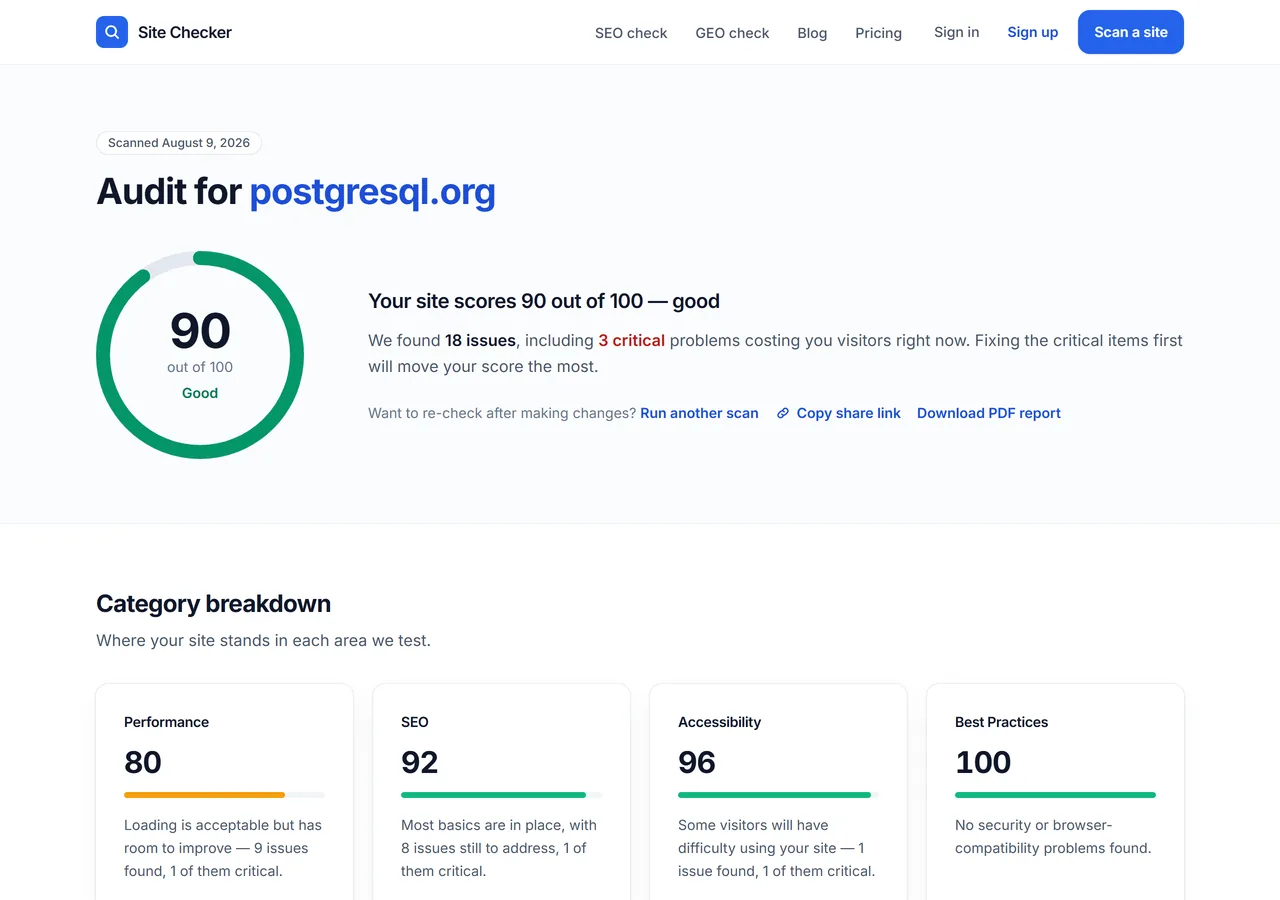
The overall score is a summary of the four categories below it. The categories are more useful than the total, because they tell you which kind of problem you have.
Read the issue list before the score. A site scoring 68 with cosmetic warnings is in better shape than a site scoring 68 because search engines are being told to ignore it, and the number alone cannot tell those apart.
Step 3: Check the basics on your key pages
Every page needs three things, and they are quick to eyeball.
A title. The text in the browser tab, and the blue link in search results. It should say what the page is about in under about 60 characters, and no two pages should share one.
A description. The gray summary under the blue link. Not a ranking factor directly, but it is the sentence that persuades someone to click rather than scroll past.
One main heading. The big heading at the top of the page. One per page, matching what the page actually delivers.
Missing titles and descriptions are the most common finding on almost every site, and among the fastest to fix.
Step 4: Check it on a phone
Most visitors arrive on a phone, and Google judges your site by its mobile version. Open your site on your own phone and try to do the main thing the site is for: buy something, book something, or find your phone number.
Watch for text too small to read without zooming, buttons too close together to tap accurately, and anything that requires horizontal scrolling. These are usability problems that show up as ranking problems.
Step 5: Check nothing is broken
Click through your own main navigation and check every link goes somewhere real. Broken links accumulate quietly — a page gets renamed and the six links pointing at the old address keep pointing there.
The scan in step 2 crawls your internal links and lists the dead ones, so you do not have to do this by hand beyond the main menu.
How to read your results without panicking
Reports are long by design, and length is not severity. Sort by severity and work in this order.
Critical means a page cannot be found or indexed. Fix today; these are usually one-line changes with a large effect. Warning means the page works but is at a disadvantage — slow loading, missing metadata, no structured data. Fix over the next week or two. Info means a refinement. Fix when the rest is done, or never.
A perfect score is not the goal and is rarely worth the effort. No critical issues, and a fast site on a phone, gets you most of the available benefit.
What this check cannot tell you
An automated check measures whether your site is capable of ranking. It cannot tell you whether anyone is searching for what you offer, whether your writing is any good, or whether other sites have linked to you. A technically flawless page about something nobody looks for ranks for nothing.
Think of it as clearing obstacles rather than creating demand. Useful, and not the whole job.
Do it now, then again next month
Run the free check on your most valuable page — usually a product, pricing or service page rather than the homepage, since homepages tend to be the best-maintained page on a site and give a flattering result.
Then put a reminder in for a month. SEO health decays as pages get added and images get uploaded, and catching that early is much cheaper than working out why traffic fell. If you want to know what the number itself means, what counts as a good SEO score covers the benchmarks, and the complete guide to running an SEO check walks through what to do with each finding once you have the report.
Frequently asked questions
- How do I check if my website is SEO optimized?
- Search site:yourdomain.com on Google to confirm your pages are indexed, then run a free automated checker on your most important page. The scan reports your score, page speed, missing titles and descriptions, mobile problems and broken links in about 30 seconds. Read the critical issues first, because those are the ones that stop pages ranking at all.
- Is there a free way to check my website's SEO?
- Yes. SiteFaults runs a full audit with no signup or card, and Google's own tools are free too: PageSpeed Insights measures loading performance and Search Console shows which of your pages Google has indexed and any errors it found. Between them you can diagnose most SEO problems without paying anything.
- What does it mean if my SEO score is low?
- A low SEO score means the checker found problems that put your pages at a disadvantage, but the number alone does not tell you how serious they are. A site can score low from many small cosmetic warnings, or from one critical issue such as a noindex tag that removes it from Google entirely. Always read the issue list rather than reacting to the score.
- How do I know if Google has indexed my website?
- Search for site:yourdomain.com with no space after the colon. Google lists the pages from your site that it has stored. If nothing appears, your site is not indexed and needs fixing before any other SEO work matters. Google Search Console gives the same answer in more detail, including why individual pages were excluded.
- How often should I check my website's SEO?
- Monthly is enough for most sites, plus a check after any redesign, migration or large content update. Problems accumulate quietly between checks: a renamed page leaves broken links behind it, and a single uncompressed image can noticeably slow a page. Regular short checks are cheaper than diagnosing a traffic drop months later.
- Do I need technical skills to check my website's SEO?
- No. Running the check requires only pasting a URL, and a good report explains each finding in plain English with the fix written out. Some fixes are things you can do yourself in your site builder, such as adding a page title or compressing an image. Others, like server configuration, are worth handing to a developer along with the report.