Free website checker: score your site in 30 seconds
A complete website checker that audits speed, technical SEO, accessibility and whether AI search tools can read your site — then explains every problem in plain English, with the fix. It is a free website audit tool, not a trial.
Free, no signup, no card. Results in about 30 seconds, and your report is deleted automatically after 30 days.
Only need one half of it? Run a focused website SEO check or check your AI search visibility.
- Checks per scan
- 91
- Average scan time
- 30s
- English explanations
- Plain
What gets checked
Three things that decide whether people find you
Every website checker scan covers all three. No dashboards to configure, no metrics you need a course to understand.
Site Health
How fast your pages load, whether anything is broken, and what visitors on a phone actually experience. We flag the slow images and scripts holding you back.
- Load speed on mobile
- Broken links & errors
- Image weight
Technical SEO
The things Google needs to rank you and most site builders quietly get wrong — titles, descriptions, heading structure, sitemaps and crawl rules.
- Titles & descriptions
- Heading structure
- Sitemap & robots
AI Visibility
Whether ChatGPT, Perplexity and Google's AI answers can understand and cite your site. Increasingly this matters more than your blue-link ranking.
- Structured data
- Content clarity
- Citation readiness
What the website checker report looks like
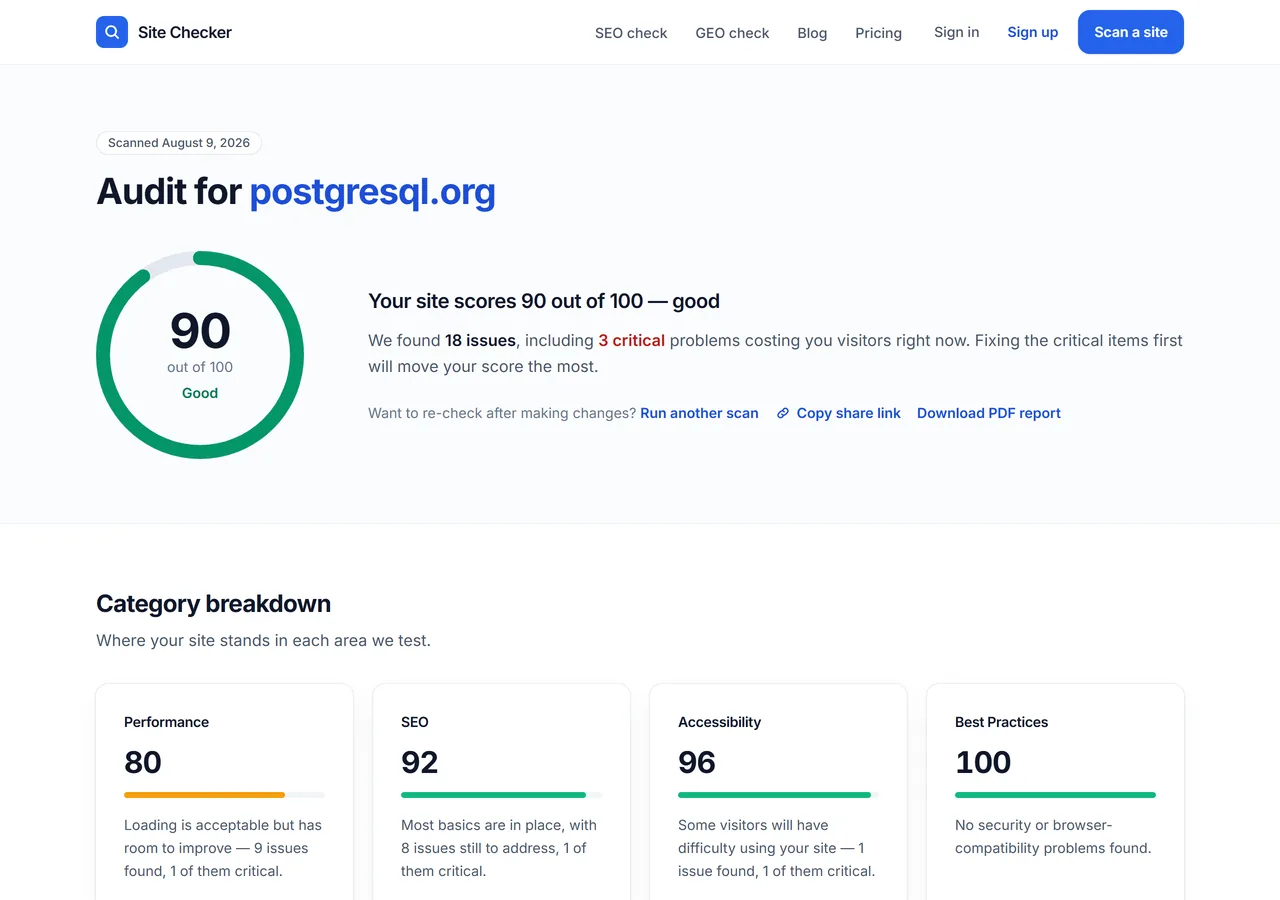
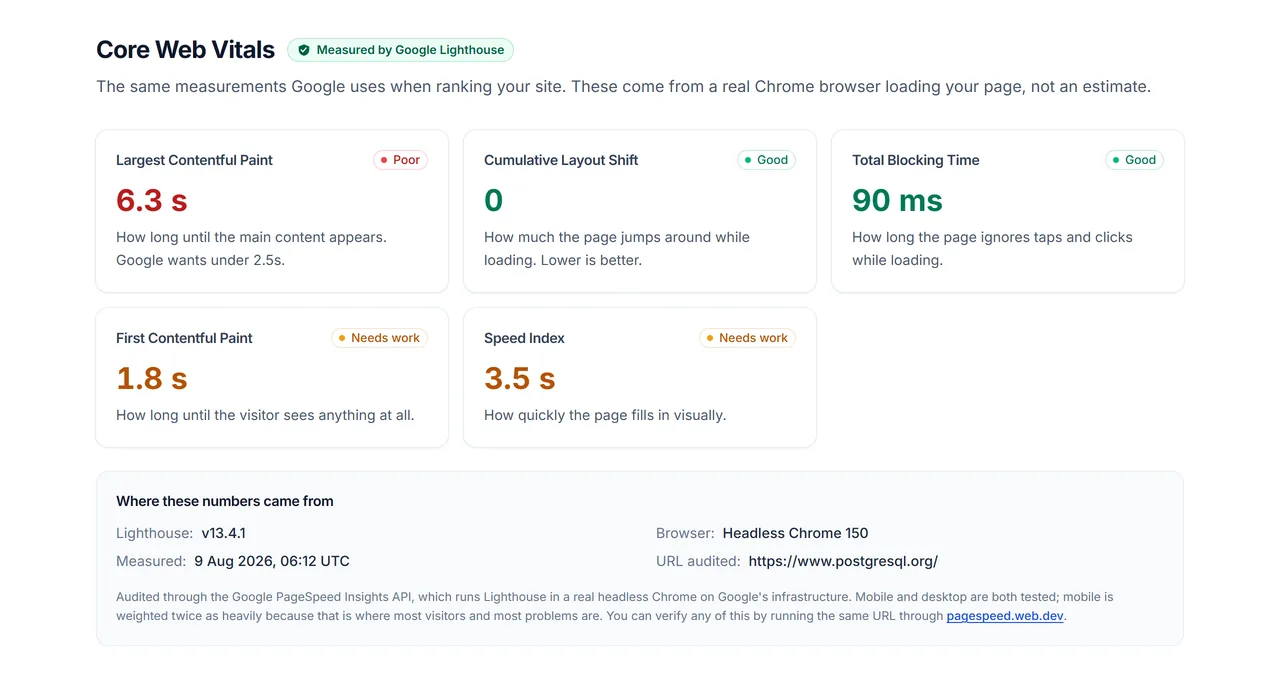
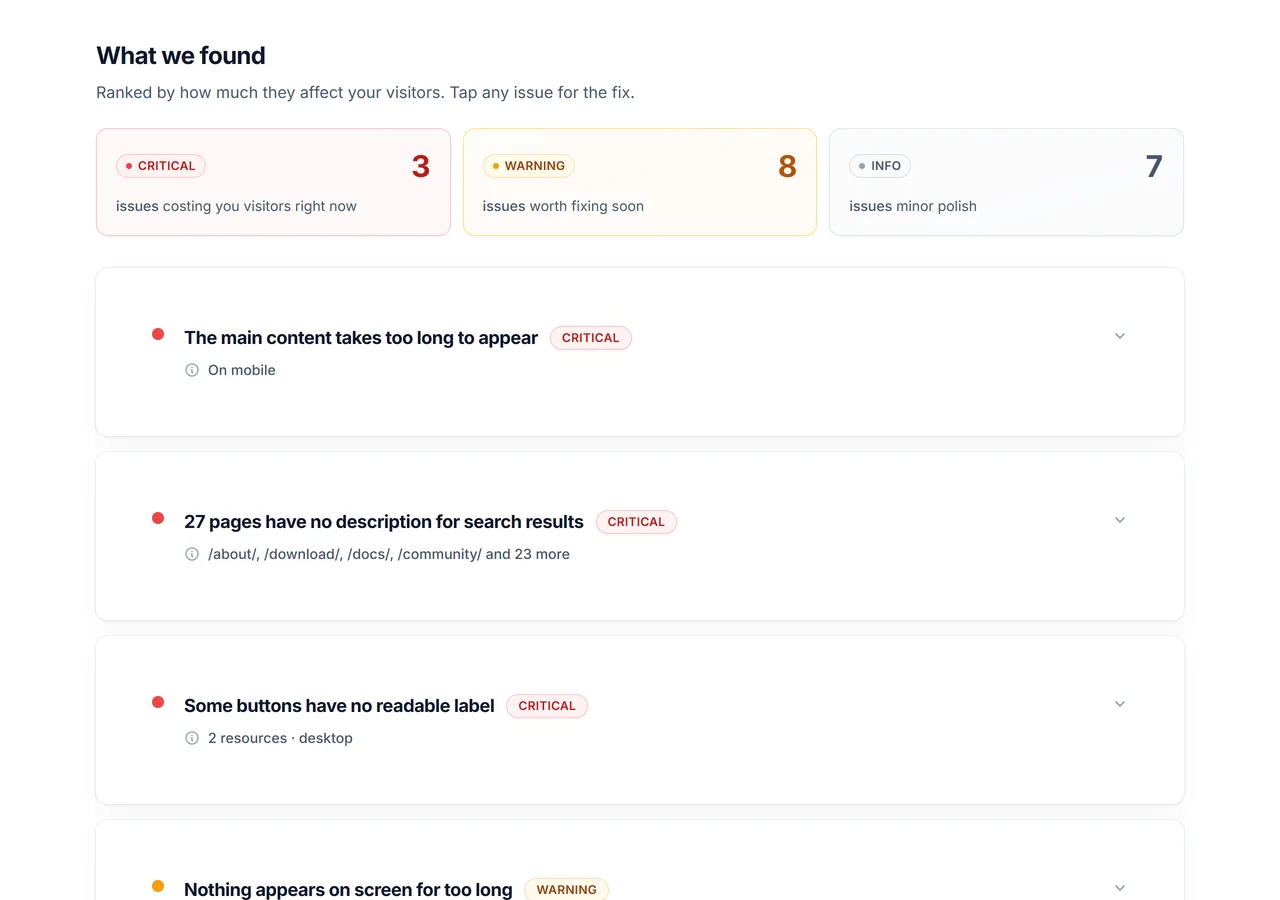
Every website checker scan produces the same four-part report: your score out of 100, a breakdown by category, real Core Web Vitals, and every issue we found with the fix written out. Below is an actual scan of postgresql.org, not a mockup.
What this website checker audits
Every website checker scan runs the same 91 checks across four categories. You see every finding on the first run — nothing is held back for a paid tier, and each issue comes with a plain-English fix.
Performance and Core Web Vitals
30 checks
How fast your pages feel to a real visitor, measured with Google's own metrics — the same ones that feed mobile rankings.
- Loading speed
- Largest Contentful Paint, First Contentful Paint, Speed Index and how long your server takes to answer the first request.
- Stability and responsiveness
- Cumulative Layout Shift, Total Blocking Time, main-thread work and how long your JavaScript takes to start up.
- Images
- Modern formats such as WebP, correct sizing for the space they fill, off-screen images that load too early, and images with no width or height set.
- Delivery and code weight
- Text compression, cache lifetimes, redirect chains, render-blocking files, and CSS and JavaScript your pages download but never use.
Technical SEO and on-page signals
31 checks
Whether search engines can reach your pages, understand them, and show them properly in results.
- Titles and meta descriptions
- Missing, duplicated, too long or too short — on every page we crawl, not just your homepage.
- Indexing and crawlability
- robots.txt, XML sitemap, canonical tags, accidental noindex tags, redirect chains and HTTP status codes.
- Page structure
- One H1 per page, heading order, pages too thin to rank, and link text that says 'click here' instead of where it goes.
- Machine readability
- Structured data, Open Graph tags for social previews, hreflang for multi-language sites, and the mobile viewport tag.
- Broken links
- Internal and outbound links that return an error or never respond, checked live rather than assumed.
- AI crawler access
- Whether GPTBot, OAI-SearchBot, ChatGPT-User, ClaudeBot, PerplexityBot, Google-Extended, Applebot-Extended and CCBot are permitted by your robots.txt.
Accessibility
17 checks
Whether people using screen readers, keyboards or high-contrast settings can actually use your site. The same fixes help search engines read it.
- Images and alt text
- Images with no alt attribute, counted across every page we crawl so you know the real scale of the job.
- Color contrast
- Text that fails the contrast ratio a reader with low vision needs to make it out.
- Forms and controls
- Unlabeled inputs, buttons and links with no accessible name, duplicated labels, and tab order that traps a keyboard user.
- Document semantics
- A valid language attribute, heading order, correctly marked-up lists, and ARIA attributes that are valid rather than merely present.
Best practices and security
13 checks
The health checks that keep a site trustworthy — the things a visitor never notices until they go wrong.
- Security
- HTTPS across the site, content security policy, and JavaScript libraries with publicly known vulnerabilities.
- Code health
- Errors in the browser console, deprecated APIs, and a missing charset or doctype declaration.
- Respectful defaults
- Location and notification permission prompts fired the moment a page loads, before anyone has asked for anything.
- Media handling
- Images served at the wrong aspect ratio or at a resolution that does not suit the screen showing them.
How your website health score is calculated
Used as a site health checker, the number to watch is the total. Your score out of 100 is a weighted average of the four categories. Performance and SEO carry 33% each, while Accessibility and Best Practices carry 17% each. Every point you lose maps to a specific finding you can read, so the number always has a reason behind it.
If a category cannot be measured — Google's speed test times out occasionally — it is left out and the rest are reweighted, rather than scored zero and quietly dragging your total down.
One caveat worth stating plainly: the crawler reads up to 30 pages per scan. On a large site that is a sample, not a full audit, and the report says so.
Or check one thing at a time
The full scan crawls your whole site. When you only need a single answer about a single page, these 19 tools give it to you directly — no signup on any of them.
- Domain age checkerSee when a domain was first registered, how old it is and when it expires. No signup.
- Keyword density checkerWord counts, density percentages and repeated phrases, from pasted text or a live URL.
- Meta tag checkerTitle, description, canonical, robots and social tags, each with a pass or fail verdict.
- Broken link checkerEvery dead link on a page, with the status code each one returned. Internal and external.
- Sitemap checkerFinds the sitemap, validates the XML, counts URLs and checks that robots.txt declares it.
- Robots.txt checkerRead and test any robots.txt — per-path verdicts for Googlebot and eight AI crawlers.
- Indexability checkerOne verdict on whether a URL can be indexed, from the five signals that decide it.
- Duplicate content checkerCompare two pages for shared text, matching titles and descriptions, and canonical conflicts.
- Core Web Vitals checkerLCP, INP and CLS for any URL, mobile and desktop, straight from Google's own measurement.
- Word counterCount words, characters, sentences and reading time in pasted text or a live page.
- SSL certificate checkerA site's SSL certificate issuer, expiry date, days left and whether the chain is valid.
- Page speed checkerA Google performance score and load timings for any URL, mobile and desktop.
- Alt text checkerList every image on a page and flag the ones with missing or empty alt text.
- Canonical tag checkerRead a page's canonical tag and see whether it points to itself or somewhere else.
- Open Graph checkerPreview how a link looks on Facebook, X and LinkedIn, with every Open Graph tag.
- HTTP header checkerA URL's full HTTP response headers, with the security headers checked off.
- Redirect checkerTrace a URL's redirect chain hop by hop, with the status code at each step.
- DNS lookup checkerLook up a domain's A, AAAA, MX, TXT, NS and CNAME records from live DNS.
- Favicon checkerFind a site's favicon, preview it, and check the declared icons actually load.
Browse all free SEO tools, read what a website SEO check actually involves, or work through the guides in the Learn hub, or read the latest SEO and AI-search posts.
The check other tools skip
Can ChatGPT and Perplexity read your site?
AI assistants answer questions by reading pages and citing the ones they can reach. If your robots.txt blocks their crawlers, they cannot read you, so they cannot quote you. You end up invisible in the answer even when you rank first in the blue links below it. This website checker reads your robots.txt and tells you exactly which AI crawlers you allow and which you turn away.
Blocking them is a legitimate choice. Plenty of publishers do it deliberately to keep their writing out of training data. The problem is doing it by accident: a theme default, a security plugin or a robots.txt copied from a template can shut out every AI crawler without anyone deciding to. The scan tells you which it is, so the decision is yours rather than your CMS's.
The 8 AI crawlers we check for
For each one the website checker asks the same question your robots.txt answers: is this crawler allowed to read the site at all?
- GPTBot — ChatGPT training
- OAI-SearchBot — ChatGPT search
- ChatGPT-User — ChatGPT browsing
- ClaudeBot — Claude
- PerplexityBot — Perplexity
- Google-Extended — Gemini
- Applebot-Extended — Apple Intelligence
- CCBot — Common Crawl
What blocking Google-Extended actually does
Blocking Google-Extended does not remove your site from Google's AI Overviews. Google-Extended controls whether your content is used for Gemini training and grounding. AI Overviews are built from ordinary Googlebot access — the same crawler that indexes you for normal search. Blocking Googlebot to stay out of AI Overviews would remove you from search results entirely, which is why the report flags this one as a decision to confirm rather than a fault to fix.
Crawler access is necessary, not sufficient
Being readable is the floor, not the ceiling. Once a crawler reaches your pages, whether it quotes them depends on how clearly they answer a question. That means structured data describing what each page is, headings that match how people actually ask, and answers written plainly enough to lift. A website checker covers the mechanical half of that — crawler access, structured data, heading structure, thin pages — and this one is honest that the writing itself is your job.
How this website checker scores your site
From URL to actionable fixes in three steps — no signup or credit card needed.
Paste your URL
No account, no credit card, no plugin to install. The website checker starts from the address you enter.
We run 91 checks
Speed, SEO fundamentals, accessibility and how AI tools read your site.
Fix what matters
Issues ranked by impact, each with a plain-English explanation and a fix.
How we compare to other website checkers
The established website checkers are good at what they were built for, and this tool is younger and narrower than all of them. Two things set it apart. It reads your robots.txt for the 8 AI crawlers that decide whether ChatGPT, Claude, Perplexity and Gemini can see your pages at all. And it crawls up to 30 pages rather than the single URL you typed, which is the only way to catch a duplicate title or missing alt text across a whole site.
| Feature | This checker | IONOS Website Checker | Seobility SEO Checker |
|---|---|---|---|
| Signup to see results | None | None stated | None for the basic check |
| Free checks per day | 3 | Not stated | 5 with a free account |
| Pages read per check | Up to 30 | The one URL you enter | The one URL you enter |
| AI crawler access in robots.txt | Yes — 8 named crawlers | Not covered | Discussed, not itemized per crawler |
| Core Web Vitals from Lighthouse | Yes, mobile and desktop | Speed, as three checks | Yes |
| Accessibility checks | Yes | Not covered | Not in the free check |
| Full-site audit | No — 30 pages is a sample | No | Yes, on Premium |
| Rank tracking and backlinks | No | No | Yes, on Premium |
| PDF export | Yes, free | Not stated | Premium only |
Competitor details read from their own public pages on 9 August 2026 and described in their terms. “Not stated” means the page does not say, not that the answer is no. Products change — check theirs before deciding.
When to use one of the others instead
Use Seobility if you need a genuine full-site audit, rank tracking or backlink data — it has all three and this tool has none of them. Use the IONOS checker if you want a fast, four-category read on a single page, including basic server and cookie checks. ScamAdviser is often listed alongside these but answers a different question entirely: it rates whether a site looks like a scam, and does not examine speed, technical SEO or accessibility at all.
What we are honest about not doing
This website checker is a 91-check audit of up to 30 pages, not a site-wide crawl, and the report says so on every scan of a larger site. There is no keyword research, no rank tracking, no backlink index and no competitor analysis. It has no brand history and no backlink profile of its own yet — which is the honest reason to judge it on the report it produces rather than on anything claimed here.
Who this website checker is for
Four jobs this website checker does well. If none of these is yours, one of the tools above may fit better.
- Agencies and consultants
You need something to show a client in a first call.
Run a scan before the meeting, then send the share link — a public page with a real score and every finding written in plain English. Because it reads up to 30 pages, it catches the site-wide problems that make a convincing case: the same title on nine pages, alt text missing across a whole gallery.
- Freelancers and web designers
You need to hand over a site you can stand behind.
Run the website checker on a build before launch and after, so the handover comes with evidence rather than assurances. The accessibility and Core Web Vitals checks catch the things that get raised later as complaints — unlabelled form inputs, layout shift, images with no dimensions set.
- Small business owners
You have been told your site has problems and cannot tell which are real.
Every finding says what it is, why it matters and what to change, without assuming you know what a canonical tag is. That makes this website checker a useful second opinion on an audit somebody is charging you to fix.
- Developers
You want Lighthouse plus the crawl, without setting either up.
Real Lighthouse runs on mobile and desktop, with the version and timestamp shown so you can see the audit was real. The crawl adds what Lighthouse does not: live HTTP status on internal and outbound links, robots and sitemap rules, and which AI crawlers your robots.txt turns away.
Frequently asked questions
Everything you need to know about using the website checker. Can't find what you're looking for? Email us.
- What is a website checker?
- A website checker is a tool that fetches your site the way a search engine does and reports what is wrong with it — how fast it loads, whether search engines and AI assistants can read it, whether its pages can be indexed, and whether its titles, links and accessibility are in order. Rather than checking one thing, it runs a whole battery of checks in a single pass and hands back a prioritized list of what to fix. This one runs 91 such checks across up to 30 pages and scores the result out of 100, with every finding explained in plain English and no signup.
- Is this website checker really free?
- Yes. You can scan any website without signing up or entering a card, and you get 3 scans per day. Every category is unlocked during early access — Performance, SEO, Accessibility and Best Practices — so you see every issue we find on the first run. It is a free website audit tool rather than a trial, and nothing is held back for a paid tier.
- How long does a website audit take?
- Most scans finish in about 30 seconds. The website checker runs Google PageSpeed, crawls your pages for technical issues and validates your structured data at the same time rather than one after another. A large or slow site can take up to a minute.
- What does the website health score mean?
- Your score out of 100 is a weighted average of four categories: Performance and SEO at 33% each, Accessibility and Best Practices at 17% each. Every point you lose maps to a specific finding you can read in the report, so the number always has a reason behind it. Read as a site health checker, it answers one question: how much is wrong, and how badly. If a category cannot be measured, it is left out and the rest are reweighted instead of being scored zero.
- How many pages does the website checker crawl?
- Up to 30 pages per scan, starting from the URL you enter and following internal links. That is a sample rather than a full-site crawl, and the report says so — on a site with hundreds of pages we read 30 of them. It is enough to find the problems that only show up across several pages, such as duplicated titles and missing alt text.
- Do I need to install anything to check my website?
- No. This is a cloud-based website checker: you paste a URL and we do the rest. There is no plugin to install, no script to add to your pages and no access to your server required.
- Can this tool check whether AI search engines can read my site?
- Yes, and it is a real check rather than a marketing line. We read your robots.txt and report which of eight AI crawlers you block — GPTBot and OAI-SearchBot for ChatGPT, plus ClaudeBot, PerplexityBot, Applebot-Extended and others — because blocking a crawler is what stops that assistant reaching your pages in the first place. We also flag missing structured data, which is what AI assistants use to understand what your business actually does.
- Do you store my website data?
- The website checker stores the report itself so you can come back to the link, and it is deleted automatically after 30 days. We do not need an account, a password or access to your hosting, and we do not sell or share what we find. Scanning the same URL again inside that window returns the stored report rather than re-running the audit.
- How often should I run a website audit?
- Run a scan after any significant change — a redesign, a migration, a batch of new pages or a theme update — because that is when technical problems get introduced. For a site under active development, a monthly website checker run catches regressions before they affect rankings. There is no benefit to scanning an unchanged site daily.
- How is this different from other website checkers?
- Most free website checkers show you a score and a partial list, then ask for an email or a subscription before revealing the rest. This website SEO checker runs 91 checks across 30 pages and shows every finding immediately, with the fix written out in plain English. It is a technical audit, not a lead-capture form with a progress bar.
- Does this replace hiring an SEO agency?
- For technical audits, largely yes: you get the same measurements an agency would run, explained clearly enough to act on yourself or hand to a developer. For ongoing strategy, content writing and link building you still want people. The honest split is that this website checker tells you what is broken, while an agency decides what to build next.
- Who is behind this website checker?
- It is built and run by one developer, Max, trading as Max Digital Studio — no team, no sales department and no investors. That is the reason the free tier is genuinely free instead of a trial, and the reason the support address reaches the person who wrote the checks rather than a ticket queue.